
Moras
k2labBusiness
4.446.00 Reviews
- Version
- 1.1.15
- Installs
- 10.00K
- Age Rating
- Everyone
Screenshots
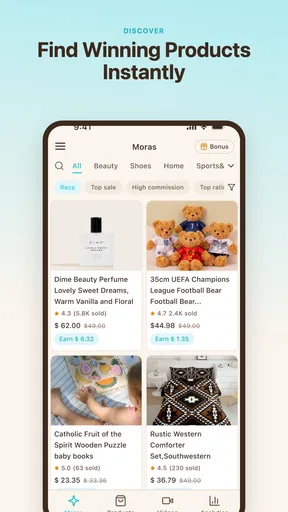
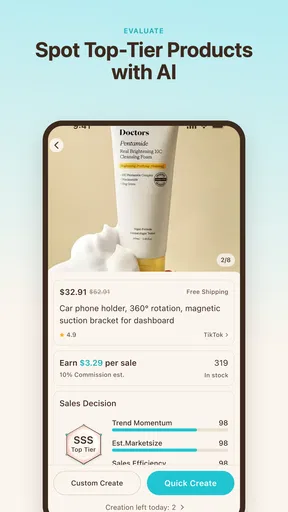
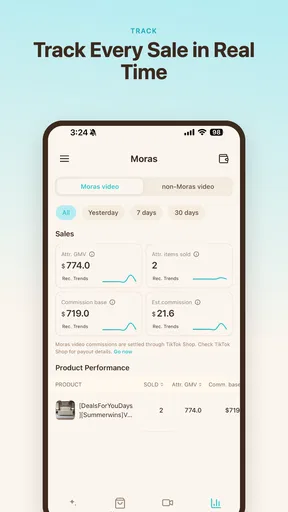
Our Review of Moras
 Analysis by Appyee
Turning a product idea into a TikTok video sounds simple until I actually try to do it consistently. I need a usable angle, a clear message, a visual plan, and enough energy to make the result feel natural rather than like an advertisement. Moras is built around that specific business problem: helping turn products into short-form TikTok content. I found it most interesting as a focused step in a larger workflow, not as a complete replacement for planning, filming, editing, and publishing.
That distinction matters. If I already know what I want to say and only need a conventional video editor, this app is not automatically the best choice. If, however, I regularly stare at a product and wonder how to make it feel relevant in a short video, Moras has a more useful role. It gives the content process a starting point and can reduce the blank-page feeling that often delays small businesses and independent sellers.
Where Moras fits before I start creating
My usual product-video workflow begins outside any app. I first decide who the video is for, what problem the product solves, and what action I want viewers to take. Without those decisions, even a polished clip can become a collection of attractive shots with no clear reason to watch. Moras makes more sense after that basic thinking, because its value is strongest when I bring a real product and a specific business goal to the process.
For example, imagine I sell handmade desk organizers. A weak starting point would be “make a viral video about this product.” A better one would be “show how the organizer clears a crowded work area in a few seconds.” That second idea gives the content a before-and-after shape. It also helps me judge whether the output feels useful, entertaining, or merely promotional. I would use Moras to help develop that product-centered concept, then review every suggestion against the audience I actually want to reach.
This is one of the app’s practical strengths: it encourages me to think in terms of the product’s place in a short video rather than treating TikTok as a general social network. That focus is valuable for sellers who have products ready but lack a repeatable creative process. It is less valuable for someone looking for broad social-media scheduling, customer relationship management, or a full marketing dashboard.
The app comes from k2lab and is listed as a free business app for everyone. Its current version is 1.1.15, and it runs on devices using Android 7.0 or later. Those details make it easy to try without turning the decision into a financial commitment, although free access does not remove the need to spend time checking whether the creative results fit a brand.
Starting with a product instead of a blank canvas
The most sensible way to approach Moras is to prepare a small product brief before opening it. I would write down the product name, its strongest benefit, the intended customer, the visual proof I can show, and one possible opening line. This takes only a few minutes, but it prevents the app from becoming a place where I repeatedly request vague ideas and receive concepts that are difficult to film.
A useful brief also separates facts from claims. “Fits three cables” is something I can demonstrate. “Makes your life better” is too broad to carry a video. When I keep the input concrete, the resulting creative direction is easier to assess. I can ask whether the idea shows the product doing something, creates curiosity in the opening seconds, and ends with a natural next step for the viewer.
I would also prepare several visual assets before building a routine around the app. A clean product photo, a close-up of an important detail, a real use scene, and a short demonstration give me more options than a single isolated image. This is a non-obvious but important trade-off: an idea-generation tool cannot compensate for weak product evidence. If the product is never shown clearly, the video may attract attention without helping someone understand what is being sold.
Capturing ideas without losing the business goal
Once I have a product brief, I would use Moras as a capture point for possible TikTok directions. I would not immediately accept the first concept. Instead, I would collect a small set of angles and sort them by purpose: demonstration, problem-solving, comparison, reaction, and behind-the-scenes. That simple grouping makes the app part of a sustainable productivity system rather than a source of disconnected creative prompts.
The strongest angle is not always the most dramatic one. A small business may benefit more from a clear demonstration than from an exaggerated attempt at virality. If I sell a kitchen item, showing the frustrating task it replaces may be more persuasive than forcing a trend into the video. Moras is useful when it helps me explore those options, but my judgement still has to decide which angle matches the product and the audience.
I would keep a short idea record outside the immediate creation session, including the product, the chosen angle, the opening, the proof shot, and the intended closing message. This avoids a common failure: generating many concepts but publishing none. It also lets me compare ideas over time. If every concept depends on the same generic unboxing scene, I know I need to change the input or rethink the product story.
Another helpful habit is to label each idea by production effort. A simple talking demonstration may be possible today, while a multi-person scenario may require more preparation. This makes Moras more practical for a solo seller. I can choose a low-friction concept when I have fifteen minutes and reserve more ambitious ideas for a planned filming session.
Building a repeatable TikTok routine
I would use the app in a weekly cycle rather than opening it only when I feel stuck. At the beginning of the week, I would choose one product and create several possible content angles. I would then select ideas that can be filmed with the equipment, space, and time I already have. During filming, I would keep the product demonstration honest and capture extra close-ups that can support more than one edit.
After publishing, I would review the result based on practical signals: Did viewers understand the product quickly? Did the opening match the actual content? Did comments reveal a question that deserves another video? This turns one idea into a small content loop. Moras can help with the beginning of that loop, while the audience response helps shape the next round.
I would also avoid treating the word “viral” as a guarantee. The app’s purpose is connected to viral TikTok videos, but no creative tool can promise that a particular product will spread. Virality depends on timing, audience interest, execution, and factors outside the creator’s control. The healthier goal is to create a repeatable supply of clear, watchable product stories. A few useful videos can support a business even when none becomes a breakout hit.
For a small shop with several products, I would rotate the routine. One week could focus on the main product benefit, another on common objections, and another on customer use cases. This prevents the feed from becoming a sequence of nearly identical sales pitches. It also gives Moras a more meaningful role: helping generate varied approaches while the business owner maintains consistency in tone and message.
How it compares with ordinary alternatives
The usual alternative is to begin directly in a video editor. That approach is better when I already have a script, footage, and a clear sequence. Editing apps usually give me more control over cuts, captions, timing, audio, and visual polish. Moras is not the obvious substitute for that kind of hands-on production. I see it earlier in the workflow, where the main problem is deciding what the video should be about.
Another alternative is to search TikTok manually for popular formats. That can reveal useful patterns, but it also creates two risks. I may copy a trend that does not fit my product, or I may spend more time browsing than creating. Moras is more focused on moving from a product toward a video concept, while manual research is better for understanding the language, pacing, and expectations of a particular audience.
Working from a blank document is free and flexible, but it depends heavily on personal creative energy. For an experienced content strategist, that may be enough. For a seller who knows the product well but struggles to translate that knowledge into short-form content, a dedicated product-to-video workflow can be easier to repeat. The trade-off is that focused guidance may feel restrictive if I want complete control over every creative decision.
I would not use Moras as my only business tool. It does not replace product photography, inventory work, customer support, analytics, or final editing. Its best position is between product planning and production. That narrow role is a strength when I need direction, but a limitation when I expect an all-in-one marketing platform.
Where the workflow can fail
The first failure point is vague positioning. If I describe a product with broad phrases and no specific customer problem, the content idea can become generic. The fix is to provide a concrete situation: who uses the product, what is difficult before using it, and what visible change happens afterward.
The second is overvaluing novelty. A surprising concept may attract an initial glance but still fail to explain what the product does. I would use a simple test before filming: remove the product name and ask whether the viewer can still understand the problem being shown. If the answer is no, the idea probably needs a clearer demonstration.
The third is production mismatch. An idea that requires several locations, actors, or complicated props may look appealing on paper but never reach publication. I would deliberately keep a small bank of concepts that can be recorded alone with ordinary surroundings. This is where a productivity mindset helps: the best idea is often the one I can finish consistently, not the one that sounds most impressive.
There is also a quality-control risk. Any generated concept still needs a human check for accuracy, tone, and reasonable claims. I would never let a creative suggestion encourage promises the product cannot support. In business content, trust is more valuable than a clever line. A video that accurately demonstrates a modest benefit can serve a brand better than an exaggerated claim that brings skeptical comments.
Finally, I would watch for repetition. If I use Moras only to produce the same hook structure again and again, the account may feel mechanical. I would keep a record of recent openings and visual patterns, then reject ideas that are too close to what I have already posted. Variety should come from different customer problems and demonstrations, not random changes that confuse the brand.
Who will get the most from it
Moras is a strong candidate for independent sellers, small online shops, makers, and early-stage businesses that have products but no dedicated content team. It can also help a person who posts inconsistently because every video begins with too much uncertainty. The app’s business focus makes it more relevant to product-led content than to personal journaling, general entertainment, or long-form video production.
I would especially recommend it to someone who can film basic footage but needs help finding several ways to present the same item. A single product can support a demonstration, a mistake-to-avoid video, a use-case scene, a quick comparison, and a response to a customer question. That variety is more valuable than simply producing one polished clip and then starting from zero.
I would be more cautious for professional creators who already have an established creative director, a tested content calendar, and a detailed editing pipeline. They may prefer tools with deeper control and broader collaboration features. I would also skip it if my main need is scheduling posts, tracking campaign performance, or editing finished footage. In those situations, a dedicated scheduler, analytics product, or full video editor is likely a better fit.
The app’s audience rating is Everyone, which makes it approachable for a broad range of users. Still, suitability depends less on age than on the type of work involved. Someone needs to be comfortable evaluating promotional ideas and adapting them to a real product. The tool can support that judgement, but it cannot replace it.
My overall experience and recommendation
The store shows Moras with an average rating of 4.4 from around eighty ratings, with more than forty written reviews and over ten thousand installs. Those figures suggest that it has found an audience among people interested in its focused concept, while the relatively specialized purpose explains why it will not appeal equally to every business user.
What I like most is the possibility of turning content creation into a repeatable chain: define the product problem, capture several angles, choose one that fits the available resources, film clear proof, and learn from the response. That process is more sustainable than waiting for inspiration. The app is most useful when I treat it as a starting point for decisions rather than an automatic publishing machine.
My main reservation is the same reason I would recommend it selectively: it is focused. Anyone expecting a complete TikTok production suite may feel that additional tools are still necessary. I would pair it with a straightforward filming and editing setup, a simple idea log, and a habit of reviewing whether each video genuinely helps the viewer understand the product.
For a free business app from k2lab, Moras is worth trying if the hardest part of your TikTok workflow happens before recording begins. Give it a specific product, a real customer situation, and a realistic production limit. Then keep only the ideas that you can explain, film, and repeat. Its real value is not promising instant virality; it is helping turn product knowledge into a usable content routine.
Verdict
Strengths of Moras
- Simple interface makes daily use quick and easy.
- Useful features are accessible without a steep learning curve.
- Runs smoothly on most modern Android and iOS devices.
- Helpful for users who prefer a focused, uncluttered experience.
- Regular use can make routine tasks more organized.
Limitations of Moras
- Some advanced options may feel limited for experienced users.
- Certain features may require an internet connection.
- The app may offer fewer customization choices than competitors.
- Notifications can become distracting if not configured carefully.
- Performance may vary on older or less powerful devices.
Similar Picks in This Category
View All
LinkedIn: Community & Network
LinkedIn3.8

Zoom Workplace
zoom.com4.1

Microsoft Teams
Microsoft Corporation4.6

Meta Business Suite
Meta Platforms, Inc.4.6

Webex Meetings
Cisco Systems, Inc.4.5

TeamViewer Remote Control
TeamViewer4.4
Frequently Asked Questions
What is Moras, and what can I use it for?
Moras is a mobile application designed to help users manage and organize their daily activities in one place. Depending on the version and platform, it may offer tools for planning, tracking progress, setting reminders, or keeping personal information organized. Before downloading, check the official store description because available features can vary between Android and iOS versions and may change with future updates.
Is Moras free to download and use?
Moras may be available to download at no initial cost, but some features, content, or services could require in-app purchases or a subscription. I recommend reviewing the pricing section in Google Play or the App Store before installing it. Also check whether subscriptions renew automatically, what trial conditions apply, and whether removing the app cancels an active subscription, as uninstalling normally does not do so.
Does Moras require an internet connection?
The internet requirements depend on which Moras features you use. Basic functions may work offline, while account synchronization, cloud storage, online content, updates, or some interactive tools may require Wi-Fi or mobile data. If reliable offline access is important to you, test the app after installation and review its permissions and official listing to understand which functions remain available without an active connection.
Is Moras safe and suitable for my device?
Moras should be downloaded only from its official Google Play or App Store listing to reduce the risk of installing an altered or unsafe copy. Before installation, verify the developer name, recent reviews, update history, requested permissions, and minimum operating-system requirements. Avoid granting access that seems unrelated to the app’s purpose, and keep your device software updated for better compatibility and security.
What should I know about privacy when using Moras?
Before creating an account or entering personal information in Moras, read the app’s privacy policy and the data-safety information shown in your app store. Pay attention to whether data is collected for account functionality, analytics, advertising, or personalization, and whether it is shared with third parties. If the app supports cloud synchronization, use a strong password and avoid storing sensitive information unless you understand how it is protected.
